Tansee Logo


Home Download Purchase Support Affiliate Info


Products:
iPod Transfer Tansee iPod Transfer
--- copy iPod song/video to computer

iPod Photo Transfer Tansee iPod Transfer Photo
--- copy iPod photo to computer

iPhone Transfer Tansee iPhone Transfer
--- copy iPhone song/video to computer

iPhone Photo Transfer Tansee iPhone Transfer Photo
--- copy iPhone photo to computer

iPhone SMS Tansee iPhone Transfer SMS
--- copy iPhone SMS to computer

iPhone SMS Tansee iPhone Transfer Contact
--- copy iPhone Contact to computer


Product Packs:
iPod Copy Tansee iPod Copy Pack
--- Tansee iPod Transfer +
Tansee iPod Transfer Photo


iPhone Copy Tansee iPhone Copy
--- Tansee iPhone Transfer +
Tansee iPhone Transfer Photo


Most Asked:
How to Get Full Version of Tansee Products?

How to transfer song/video from iPod to 
		computer How to transfer song/video from iPod to computer?

How to transfer photo from iPod to 
		computer How to transfer photo from iPod to computer?

How to transfer song/video from iPhone to 
		computer How to transfer song/video from iPhone to computer?

How to transfer photo from iPhone to 
		computer How to transfer photo from iPhone to computer?

How to transfer SMS from iPhone to 
		computer How to transfer SMS from iPhone to computer?

How to transfer Contact from iPhone to 
		computer How to transfer Contact from iPhone to computer?


How to Get Full Version of Tansee Products?

Why Get Full Version?
How to Get Full Version?
Is the Purchase Secure?
Why the Program Says the License Code is Invalid?
I Forget My License Code, How to Retrieve?
What is Extended Download Service?
How to copy and paste the key code?


Why Get Full Version?
All the Tansee products provide you free trial version, you can download them free at here. We remind you Tansee products are cripplewares, i.e. the trial version are functional limited, if you want get the full version, just paid Tansee the register fee by here for the full functions.

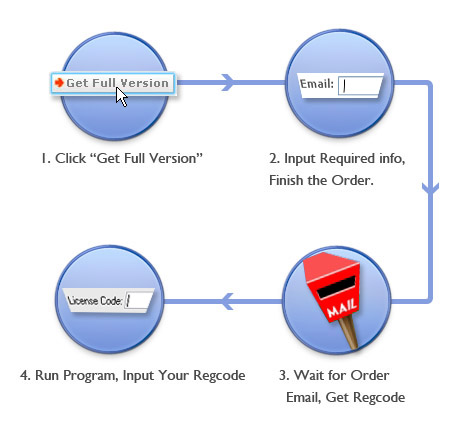
How to Get Full Version?
The order process shown in Figure 1

Tansee Full Version
Figure 1: Order Process

Tansee Order Process
Figure 2 (Click to Enlarge)

  • Step 1.Click "Buy Now" button in Tansee program or "Get Full Version" in our purchase website, the order page will shown as Figure 2, input quantity, click "Order Now" button.


    Tansee Order Process
    Figure 3 (Click to Enlarge)

  • Step 2. Now you entered the order detail page. Change quantity of our product if need. You can also select removing "Extended Download Service" (What is Extended Download Service?) by check the remove checkbox of extended download service. Input all required info. You had a choice to determine whether get a CD. The last choose your payment method, note we accept credit card, paypal, Bank/Wire Transfer, Invoice... Finish the process by click the "Place Your Order" button.


  • Tansee Order Process
    Figure 4 (Click to Enlarge)

  • Step 3.
  • Review your order detail, the items in the list and the total price, then click the "Place Your Order" button.


    Tansee Order Process
    Figure 5 (Click to Enlarge)

  • Step 4.
  • Finish the order on this page , you can find some important info, most important is your license code of our product. You can also automatically receive an email immediately, the email contains the license code too, it's a 20-characters-long string. You will be prompted for the license code when you run the program, just input them, the program will notify you whether the code is valid. Now you can enjoy the full version!


    Any incident and question about the order process, please contact us.


    Tansee Order Process
    Figure 6: Secure Guarantee
    Is the Purchase Secure?
    It's secure and hacker safe, all the Tansee Online Transaction powered by Regnow- a software industry ’s premier registration commerce provider. Hacker safe Guarantee of Regnow .
    When you enter the purchase page (As Figure 6), note:
  • The initial of the link is https, not http, this means the information transfers via the internet is encrypted.

  • A lock logo display on the IE status bar, this means the information transfers via the internet is encrypted.

  • A Hacker Safe logo on the left of the page, the site with this logo means it is tested and certified daily to pass the FBI/SANS Internet Security Test. The "live" HACKER SAFE mark appears only when a web site's security meets the highest security scanning standards of the U.S. government, Visa, MasterCard, American Express, Discover and JCB. it's hacker safe. Click the logo for more info when purchase.


  • Why the Program Says the License Code is Invalid?
    We tested the key code before send it to customers, if your key code shown as "Invalid Key Code", please note:
    1, The license code is a 20-character-long string.
    2, Do not add any spaces to it, especially the front and the end of the string.
    3, We recommend customers copy and paste the key code to the program. Manual input the key code one-by-one character , maybe mistake input some one in it.
    4, Make sure you download the right program, different product fits different key code.
    If still can't work, please email us.

    I Forget My License Code, How to Retrieve?
    You can retrieve the license code by contact US. In the email please mention your order id or the email address you finish the order or other info about the order. We will answer you ASAP.

    What is Extended Download Service?
    Because Not Everything Goes As It Should. Think of this as your digital safety net for those unexpected occurrences - like your hard drive frying or a virus infection. EDS means that with the purchase of your digital product, we'll keep a copy of your file for ONE FULL YEAR. You'll gain peace of mind knowing that we have your program stored and ready for you to download again [for FREE] at your convenience once your computer is up and running again. A little extra insurance on your order to keep your products safe? Why not!

    Tansee Order Process
    Figure 7 (Click to Enlarge)
    How to copy and paste the key code?
    Some customers received a error message "Invalid Key Code" when input the key code. We recommend customers copy and paste the key code to the program.
    Step 1, Using your mouse select the key code in purchase email or purchase website. Press keyboard "Ctrl + C" or right click on selected text to copy key code. Shown in figure 7.


    Tansee Order Process
    Figure 8 (Click to Enlarge)


    Step 2, Run program, when program prompting input key code, just press keyboard "Ctrl + V" or program button "Paste" to paste key code. Note: the code is 20-character-long. Then click "Ok" checking key code is invalid or not.


    Most Asked Question

    iPod Products Question:
    How to Transfer Song/Video/Photo from iPod to Computer?
    How to Transfer Song/Video from iPod to Computer?
    How to Transfer Song/Video from iPod to iTunes Music Library?
    How to Transfer Photo from iPod to Computer?
    Why Can't I Transfer Song/Video from iPod to Computer?
    Why Can't I Transfer Photo from iPod to Computer?

    iPhone Products Question:
    How to Transfer Song/Video/Photo from iPhone to Computer?
    How to Transfer Song/Video from iPhone to Computer?
    How to Transfer Song/Video from iPhone to iTunes Music Library?
    How to Transfer Photo from iPhone to Computer?
    How to Transfer SMS from iPhone to Computer?
    How to Transfer Contact from iPhone to Computer?
    How to Restore Contact from Computer to iPhone?
    Why Can't I Transfer SMS from iPhone to Computer?
    Why Can't I Transfer Contact from iPhone to Computer?

    Tansee.com
    Copyrights 2006-2013
    All Rights Reserved